
Price anchoring is one of the simplest ways to make a quote easier to understand. It means the first meaningful price a client sees becomes a reference point for judging every other option. If that reference point is random, the client may compare your work to the cheapest number on the page. If it is structured well, the client can see the value, tradeoffs, and safest path forward.
Used badly, anchoring feels manipulative: an inflated premium option, a fake discount, or a confusing wall of packages designed to push the client toward the middle. Used well, it gives the client context. It says, “Here is the full version, here is the focused version, and here is the practical recommendation based on what you told us.” That is the difference between pressure and clarity.
What price anchoring looks like inside a quote
In a service quote, the anchor is usually the highest package, the first package shown, or the option labeled as recommended. For example, a design studio might present a complete brand identity at $8,400, a lean identity refresh at $4,900, and a starter visual cleanup at $2,200. The $8,400 option helps the client understand what “complete” means, while the $4,900 option feels grounded rather than expensive in isolation.
This is why option order matters. A quote that starts with the cheapest path can train the client to cut scope before they understand the outcome. A quote that starts with the full outcome helps the client see what is being removed when they choose less. The goal is not to hide cheaper choices. The goal is to make the tradeoffs visible.
Use anchors ethically: context first, pressure never
Ethical price anchoring starts with honest scope. Do not invent a premium package nobody should buy just to make another option look cheaper. Do not make the low option unusable. Do not use fake “normally $10,000, today $5,000” framing unless there is a real, documented reason.
A better approach is to connect each option to a business situation. The premium option is for clients who want speed, depth, or reduced internal effort. The recommended option is for the most common need. The smaller option is for clients who need a limited first step. Research on the anchoring effect in marketing shows why initial reference points influence perceived value, but in quoting, that psychology should be used to explain value rather than disguise cost.
A simple three-option structure
If you are not sure where to start, use three options: Complete, Recommended, and Starter. Complete shows the full opportunity. Recommended matches the client’s stated goal. Starter gives a lower-commitment path with clear limitations. This mirrors the logic behind good-better-best pricing, but the labels should sound natural for your service and audience.
Example for a web design quote
- Complete launch package: strategy, UX, copy guidance, design, development, testing, analytics setup, and post-launch support.
- Recommended website build: core pages, responsive design, development, basic SEO setup, testing, and handover.
- Starter landing page: one focused page for a campaign, offer, or service line with limited revisions.
Notice that each option is different in scope, not just price. That matters. If the client cannot see what changes between the options, anchoring becomes decoration instead of decision support.
Where to put the recommended option
For most service businesses, the recommended option should sit between the highest and lowest option. It should be visually clear, but not obnoxious. A small “Recommended based on your brief” label is stronger than a loud “Best value!” badge, because it shows the recommendation came from the client’s needs rather than your sales target.
Sample wording: “Based on your goal of launching before the trade show while keeping the project focused, we recommend Option 2. It includes the core pages, launch support, and testing needed for a professional release without the broader brand strategy included in Option 1.”
Anchor with outcomes, not just totals
A strong anchor does not only show a bigger number. It explains what the bigger number includes: less client admin, faster turnaround, deeper research, more testing, better documentation, or fewer future rework risks. This is where many quotes fail. They list tasks, then expect the client to understand why one option is worth more.
Good quote presentation makes value visible. McKinsey’s work on the hidden power of pricing reinforces a useful point for service businesses: pricing discipline has a major impact when it is tied to value, not guesswork. In a quote, that means every option should show the client what they gain, what they give up, and why the recommended path is sensible.
Protect your margin while still showing enough detail
Anchoring works best when the client sees the right level of detail. Show deliverables, milestones, assumptions, and optional extras. Keep internal margin math, subcontractor buffers, and sensitive cost structure out of the client-facing view unless there is a specific reason to expose it. If you want a deeper guide on that balance, read what clients actually need to see in a quote.
This is where a focused quoting tool helps. In Ququ, you can build reusable products and templates, keep internal costs hidden, and let automatic redistribution roll those internal costs into visible client-facing prices. That means your quote can look clean and confident without turning into a spreadsheet of margin explanations.
Use optional add-ons without overwhelming the client
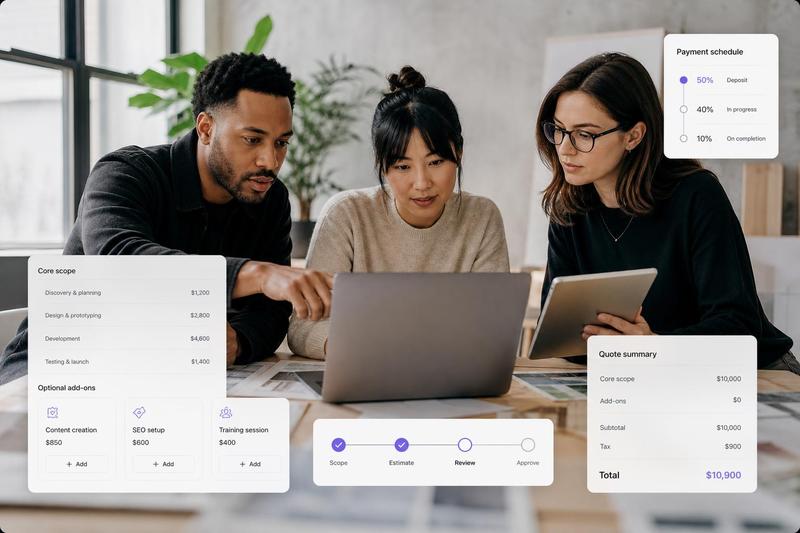
Add-ons can support price anchoring if they are organized carefully. Put the main recommendation first, then list optional extras that solve specific problems. For example, a contractor might quote a standard installation, then offer optional premium materials, disposal, or annual maintenance. A consultant might quote a workshop, then offer implementation support or a follow-up review.
The key is to avoid making the client rebuild the whole quote themselves. Too many optional line items can create decision fatigue. A good rule: include the essentials in the recommended option, then offer only two to four add-ons that are genuinely optional.
Common price anchoring mistakes
- Starting with the cheapest option: This can make every better option feel like an upsell instead of a scope difference.
- Creating a fake premium tier: Clients can often sense when an option exists only to manipulate the comparison.
- Using vague labels: “Basic, Standard, Premium” is less useful than labels tied to outcomes or project stages.
- Hiding tradeoffs: If the cheaper option removes testing, support, revision time, or project management, say so clearly.
- Overloading the quote: Five packages and twelve add-ons may look flexible, but it usually slows approval.
Price anchoring checklist for your next quote
- Define the client’s goal before building options.
- Create a complete option that honestly represents the full solution.
- Mark one option as recommended only when it truly matches the brief.
- Explain what changes between options in scope, speed, risk, and support.
- Keep internal margin details private while showing enough client-facing value.
- Limit optional add-ons to the few that make the decision easier.
- Use a reusable quote template so your team presents options consistently.
Price anchoring is not about making a quote feel cheaper than it is. It is about giving the client a fair reference point so they can choose with confidence. When your options are honest, your recommendation is specific, and your quote is cleanly presented, anchoring helps clients understand value faster.
If you build quotes often, save this structure as a reusable template in Ququ: one complete option, one recommended option, one starter option, and a short list of add-ons. You will quote faster, keep your presentation consistent, and make the client’s decision easier without turning the conversation into a pricing debate.